Tiny Llama
This tutorial trains a ~4M-parameter Llama model from scratch on the TinyStories dataset. On a single RTX 4090 it takes roughly 2-3 minutes. When it finishes, the model produces surprisingly coherent short stories.
The tutorial is intended as a first introduction to Forgather. It doesn't assume you know how anything Forgather-specific works; each command is explained in context, and the "Anatomy" section at the bottom walks through why the config is shaped the way it is.
There is also a companion Jupyter notebook that
covers the same material interactively, with a pre-existing configuration
(train_tiny_llama.yaml) built directly on Forgather's lower-level
templates. This README focuses on the newer v2.yaml configuration, which
is built on Forgather's recommended lm_training_project.yaml base
template and is the pattern you'd copy for a new project.
Hardware: one or more NVIDIA GPUs. The default v2.yaml config uses
DDP (DistributedDataParallel -- each GPU runs a copy of the model on a
different slice of the batch, and gradients are averaged across GPUs at
each step). It works on anything from a single GPU upward; on a single
GPU, DDP degrades to plain training with no performance penalty.
Before You Start
From a shell, from this directory:
List the available configurations:
You should see five entries. This tutorial uses the last one:
Inspect the fully-resolved configuration for v2.yaml:
Everything you'll see in later sections (trainer arguments, dataset paths,
optimizer choice, learning rate schedule, etc.) is derived from this one
file and its parents -- lm_training_project.yaml and the templates
lm_training_project.yaml itself extends. pp ("pre-process") is the
quickest way to check whether the config is valid and see what each knob
resolves to.
Debugging a broken config: if forgather ls shows PARSE ERROR
instead of a config's description, try (in order of increasing verbosity):
forgather ls -d                      # dumps the preprocessed file with
                                     # line numbers; shows YAML errors
                                     # directly, or the Jinja2 error if
                                     # preprocessing itself failed
forgather -t v2.yaml pp --debug      # dumps every template in the chain
1. Train the Model
That's the whole command. On a machine with multiple GPUs it launches one DDP worker per GPU; on a single-GPU box it runs as a single process. The training script:
- Loads TinyStories from
examples/datasets/roneneldan(packed into 2048-token blocks so nearly every token in a batch is real text). - Constructs a fresh 4M-parameter Llama from
examples/models/llama. - Trains for 80M tokens (roughly 10× the Chinchilla training-optimal budget for a 4M model -- see the "Training budget" section further down) with a cosine-decay LR schedule and automatic batch-size-aware LR scaling.
- Saves checkpoints to
output_models/v2/checkpoints/and TensorBoard logs tooutput_models/v2/runs/.
Quick profile run (no checkpoints, 200 steps, then exits cleanly):
Useful for sanity-checking a new config change -- you get tokens/sec, loss
curve, and peak memory without committing a full run's worth of disk.
Note: because --save-strategy no writes no checkpoints, a profile run
alone won't give you a model for sections 4 and 5. Run the full train
command above at least once to produce output_models/v2/checkpoints/.
Resume behaviour: After a checkpoint has been written, any subsequent
train invocation with the same config resumes from the newest checkpoint.
If you run train again after a completed run, the trainer will see it
has already reached max_steps and exit immediately. To extend training,
either raise the token budget (--total-tokens 160, for example) or
delete the output directory.
Re-building after editing model source code: the generator writes
Python source into output_models/v2/ on first construction and reuses it
on subsequent runs. If you change the underlying model templates, remove
the output directory before retraining so the new source is regenerated:
2. Monitor Training
While training runs, open TensorBoard on the output directory:
forgather -t v2.yaml tb        # watch just the v2 config's output
forgather tb --all             # watch every model in output_models/
TensorBoard reads each runs/<timestamp>/ subdirectory automatically.
The --all form is handy once you have several configs under this
project -- you can compare loss curves in the same TensorBoard view.
Remote / headless machines. TensorBoard binds to localhost:6006
by default. If your browser isn't running on the training machine:
- SSH port-forward (recommended). Connect with
ssh -L 6006:localhost:6006 training-hostand then openhttp://localhost:6006in the browser on your laptop. - Bind to all interfaces. Pass
-- --bind_allto TensorBoard:forgather -t v2.yaml tb -- --bind_all. This opens port 6006 on every network interface with no authentication or TLS -- only do it on a trusted network.
For quick offline inspection of a completed run (no arg = auto-detect the latest run in the current project):
Both commands accept an explicit path too -- forgather logs summary
path/to/trainer_logs.json. forgather logs summary --all prints a
compact one-line-per-run table across every run under output_models/.
3. Control a Running Job
Forgather attaches a control server to each training process. From a second shell while training is in flight:
forgather control list                 # see running jobs
forgather control status JOB_ID        # detailed status for one job
forgather control save JOB_ID          # force checkpoint save
forgather control stop JOB_ID          # graceful stop (saves a final checkpoint)
forgather control save-stop JOB_ID     # save then stop
forgather control abort JOB_ID         # stop without saving (use for failed experiments)
forgather control cleanup              # prune dead job endpoint files
JOB_ID is the token printed in the training log (Trainer control
endpoint: http://.../jobs/<JOB_ID>). Prefer these commands over Ctrl-C --
Ctrl-C can leave worker processes hanging, especially under DDP.
4. Evaluate the Model
After training completes, run the TinyStories test-split evaluation.
Pass -t v2.yaml so the eval subcommand knows which project config to
read (otherwise it falls back to the project's default config, which
produces a different output_models/ subdirectory and fails to find
your checkpoint):
Output looks like:
========================================================================
Evaluation: tinystories  (Eval: TinyStories)
------------------------------------------------------------------------
Model:            .../output_models/v2
Dataset:          .../examples/datasets/roneneldan  [tinystories-packed.yaml]
Target:           test_dataset
Trainer:          ddp  (world_size=1)
Batch size:       16  max_length=2048
Dtype:            bfloat16  attn=sdpa
========================================================================
...
eval_loss:        1.46
perplexity:       4.32
wall_time:        5.84 s
========================================================================
Reading the numbers:
eval_loss-- intuitively, how surprised the model was by the correct next token, averaged over every token in the test set. Zero means the model assigned 100% probability to the right token every time; higher numbers mean it was consistently uncertain. Technically, it's the average per-token cross-entropy in nats. At each token position, the model outputs a probability distribution over every token in the vocabulary; the loss for that position is-log(p)wherepis the probability the model assigned to the token that actually came next.ln(vocab_size)(≈ 7.6 for our 2K vocabulary) is the loss of a uniform-random guesser.perplexity = exp(eval_loss)-- intuitively, how many options the model was effectively juggling when predicting the next token. Perplexity 4.32 means "on average, the model acts as if it's picking between about four equally-plausible next tokens." Lower = more confident. Technically it's the same cross-entropy rescaled to an "effective branching factor": perplexity 1.0 is perfection (always right), perplexity equal to vocab size is random guessing. 4.32 on a 2K-vocab tokenizer means our model has narrowed 2,000 possibilities down to the equivalent of ~4 per step -- strong for a 4M-parameter model trained in a couple of minutes.
Perplexity is only directly comparable between models that use the same tokenizer (a smaller vocabulary makes perplexity artificially lower, because there are fewer things to choose among). To compare against a Llama-2 / Mistral / GPT-style model you'd need to run the same test text through each model's own tokenizer and compare cross-entropy per byte rather than per token.
By default, forgather eval test evaluates the latest checkpoint of the
current project's output directory. To evaluate a different model, pass
--model /path/to/model. forgather eval list shows all available eval
configs (openorca, fineweb-edu-dedup, tinystories, etc.).
Results are written under output_models/v2/evals/ as markdown + JSON.
5. Generate Text
Start the OpenAI-compatible inference server. -m points at the model
directory; -c tells it to resume from the latest checkpoint in that
directory rather than loading the base model weights in place.
Alternative: link the checkpoint into the model directory. Forgather
stores checkpoints in output_models/v2/checkpoints/checkpoint-N/, while
the base model code + config.json live at output_models/v2/ itself.
Hugging Face's AutoModelForCausalLM.from_pretrained() only looks in the
directory you give it, so if you want to load the trained weights with a
third-party tool that expects a plain HF model directory, symlink the
latest checkpoint's weight files up into the base directory:
After this, AutoModelForCausalLM.from_pretrained("output_models/v2")
loads the trained weights without needing -c. See generate_demo.py
in this directory for a runnable example.
From another shell, send it a completion prompt:
Or chat interactively:
The model was trained without a chat template, so completion mode ("give the model some text and let it continue") produces the most natural output. Try different sampling settings:
# Greedier (more "safe" outputs)
forgather inf client --completion "Once upon a time" --temperature 0.3

# Wilder (more varied, occasionally incoherent)
forgather inf client --completion "Once upon a time" --temperature 1.3
Stop the server with Ctrl-C.
Alternative: generate from Python directly
The inference server is convenient for interactive use and for tools
that speak the OpenAI API. If you'd rather generate text from a plain
Python script -- say, for a batch job, a notebook, or just to poke at
the sampling internals -- this project ships a standalone
generate_demo.py that does exactly that.
Before first use, make sure the latest checkpoint has been linked into
the model directory (see the checkpoint link section above). Then:
./generate_demo.py                                # run both modes on default prompts
./generate_demo.py --mode hf                      # model.generate() only
./generate_demo.py --mode manual                  # hand-rolled sampling only
./generate_demo.py --max-new-tokens 200           # longer continuations
./generate_demo.py --model output_models/my_experiment   # different model
The script demonstrates two equivalent ways to sample from a causal LM:
--mode hfcallsmodel.generate(...)with a standardGenerationConfig(temperature 0.7, top-p 0.9, repetition penalty 1.15). This is the normal way to use an HF model.--mode manualdoes the same job without callinggenerate: it runs one forward pass per new token and applies repetition penalty, temperature scaling, top-p filtering, and multinomial sampling to the logits in plain PyTorch. Read thesample_tokenfunction if you've ever wondered whatgenerateactually does under the hood -- every operation is ~5 lines of tensor math with a comment explaining which knob does what.
The manual path is what you'd use when you need behaviour the high-level
API doesn't expose: custom stopping conditions, logit introspection,
streaming token-by-token, or a custom sampler. Because it loads the
model through plain HF AutoModelForCausalLM.from_pretrained, the
same pattern works for any model compatible with transformers, not
just Forgather-format ones.
6. Export to a Plain HF Llama Model
Forgather-format models work with Forgather's own tooling
(forgather inf server, the inference client, forgather convert) and
with AutoModelForCausalLM.from_pretrained(..., trust_remote_code=True)
in transformers. To hand the trained model off to tooling that expects a
"plain" HF Llama checkpoint -- e.g. vLLM, llama.cpp conversion, a third-
party evaluation harness -- convert it to the vanilla
transformers.LlamaForCausalLM architecture:
The --reverse flag forces a Forgather→HF conversion; --model-type
llama selects the target HF architecture. The output directory holds a
standard HF layout (config.json with model_type: llama,
model.safetensors, tokenizer files), loadable by any HF-compatible
tool:
from transformers import AutoModelForCausalLM, AutoTokenizer
model = AutoModelForCausalLM.from_pretrained("/tmp/tiny_llama_hf")
tok   = AutoTokenizer.from_pretrained("/tmp/tiny_llama_hf")
No trust_remote_code=True is needed -- the converter writes standard
HF Llama weights, not Forgather's dynamic-code format.
Note: at time of writing, the converter's auto-detection misclassifies Forgather-native models as HF and fails without
--reverse. Passing both--reverseand--model-type llamaexplicitly is the reliable path until that's fixed.
At this point you've trained, monitored, controlled, evaluated, served, and exported a language model. The rest of this document explains how the config that made that possible is put together, and shows how to modify it.
How Forgather Configs Work
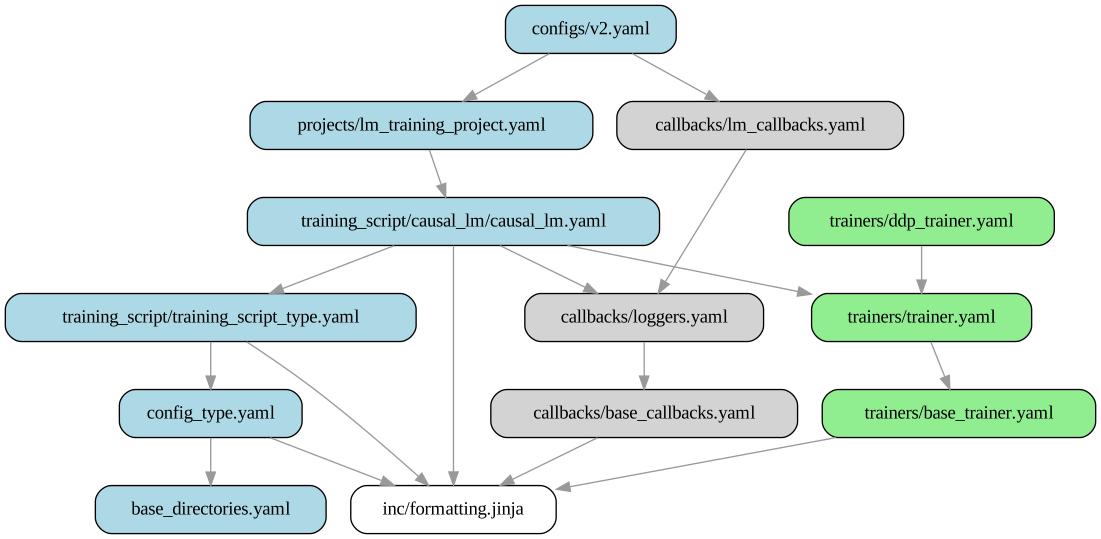
A Forgather config is a YAML document pre-processed through Jinja2. The pre-processing step is how small child configs can inherit from large, feature-rich parent templates and override only what they want to change.
The layers:
v2.yaml                             <- this project's config
  extends lm_training_project.yaml  <- Forgather's LM training template
    extends training_script/causal_lm/causal_lm.yaml
      extends ...                   <- base templates
Each level can override named blocks from any level above it using Jinja2
syntax. Forgather uses line statements (-- prefix at column 0) so YAML
remains readable:
-- extends "projects/lm_training_project.yaml"

[config_metadata]
    == super()
    -- set ns.config_name = "Tiny Llama v2"
[config_metadata] is a named YAML block; == super() injects everything
the parent template wrote there, and -- set ns.config_name = ...
overrides one namespace variable. You can read the fully-rendered,
post-inheritance result any time with forgather -t v2.yaml pp.
To explore the inheritance tree for this config:
forgather -t v2.yaml trefs

# The image below was generated with
forgather -t v2.yaml trefs --format svg -o v2.svg
For the complete syntax reference see docs/configuration/syntax-reference.md.
For the lm_training_project.yaml parameter list see
docs/project-templates/lm-training-projects.md.
For a complete listing of a training options see docs/trainers/trainer_options.md
v2.yaml Anatomy
Open templates/configs/v2.yaml side-by-side with the explanation below.
The file is ~80 lines; almost every line corresponds to one knob documented
at the top of lm_training_project.yaml.
Metadata and dataset
[config_metadata]
    == super()
    -- set ns.config_name = "Tiny Llama v2"
    -- set ns.model_name = model_name | default("v2")

    -- set ns.trainer_type = trainer_type | default("ddp")
ns is the configuration namespace the parent templates build up -- each
-- set ns.X = ... line pushes a value into it. The | default("...")
filter means "if the variable X wasn't passed on the CLI, use this
default." ns.trainer_type = "ddp" selects the DistributedDataParallel
trainer; "basic" (single-GPU), "fsdp2", and "pipeline" are the other
choices.
    -- set ns.dataset_proj = abspath(dataset_proj | default(joinpath(ns.forgather_dir, "examples", "datasets", "roneneldan")))
    -- set ns.dataset_config = dataset_config | default("fast-iter-packed.yaml")
These two lines point at a sibling dataset project (not a raw dataset
file). Dataset projects are themselves Forgather projects that describe
how raw text is tokenized, packed, and split. fast-iter-packed.yaml
takes the TinyStories corpus, packs variable-length stories into
fixed-size 2048-token blocks with document boundaries marked for the
collator, and streams the result as an iterable dataset.
Model
    -- set ns.model_project_dir = abspath(model_project | default((joinpath(ns.forgather_dir, "examples", "models", "llama"))))
    -- set ns.model_project_config = model_config | default("4M.yaml")
Same pattern for the model: lm_training_project.yaml instantiates the
model by loading a sibling model project. 4M.yaml selects the
4M-parameter Llama variant; sibling configs in examples/models/llama/
include 10M.yaml, 30M.yaml, etc.
Training budget
    -- set ns.total_tokens = total_tokens | default(80)          # millions
    -- set ns.warmup_tokens = warmup_tokens | default(8)
    -- set ns.min_cooldown_tokens = min_cooldown_tokens | default(40)
lm_training_project.yaml derives the number of optimizer steps from the
token budget and the batch/sequence settings below. 80M tokens at
2048 seq_len × 8 batch-size on a single GPU works out to ~5140 steps.
Cosine LR decay anneals over the last total_steps - warmup_steps,
clamped to at least min_cooldown_tokens so a short budget doesn't crush
LR to zero in a few hundred steps.
Why 80M tokens for a 4M-parameter model? There are two different questions hiding inside "how much data do I train on":
- Training-optimal (the Chinchilla recipe; Hoffmann et al. 2022): given a fixed training compute budget, what parameter-count / token-count split gets the lowest loss? Chinchilla fit a scaling law to a sweep of runs and found the sweet spot for this tutorial's 4M-parameter model to be around 8M tokens (≈ 1× Chinchilla). Training longer than that still reduces loss, but less than doubling the parameter count would at the same extra compute cost -- so from a training- compute-per-unit-loss perspective it's "wasteful."
- Inference-optimal: given that I'll serve this model many times, how do I minimize total cost (training + inference)? Once the model ships, each inference call runs every parameter, so a smaller over-trained model is cheaper to serve than a larger Chinchilla-optimal model at the same loss. Modern recipes therefore train well past Chinchilla -- Llama-2 was ~10× Chinchilla, Llama-3 was ~75×.
v2.yaml defaults to total_tokens = 80 (80M, roughly 10×
Chinchilla-optimal for a 4M model), in the inference-optimal
direction. For a 1B model Chinchilla-optimal would be ~20B tokens; at
10× that's 200B. For a 70B model, Chinchilla is ~1.4T and 10× is ~14T.
You can move back toward training-optimal for quicker experiments
with --total-tokens 8 (or any other number), at the cost of a
somewhat-higher final loss.
Batching, LR scaling
    -- set ns.seq_len = seq_len | default(2048)
    -- set ns.per_device_train_batch_size = batch_size | default(8)
    -- set ns.base_lr = lr | default(1.0e-3)
ns.base_lr is the learning rate at the reference batch size of 16K
tokens per step. If you change batch_size, seq_len, or the number of
GPUs, the parent template scales LR by
(actual_tokens_per_step / 16384) ^ 0.5 -- so the same config stays
stable across 1-GPU and 8-GPU runs without retuning. Override with
--lr.
Trainer arguments
The [trainer_args] block adds to what the parent already set:
[trainer_args]
    == super()
    eval_on_save: True            # run eval every time we checkpoint
    torch_compile_dynamic: False  # fixed sizes; slightly faster
    mixed_precision: bf16
    max_grad_norm: 1.0            # clip gradients (insurance vs. spikes)
Generation during training
    -- set ns.eval_prompts_file = "prompts/tiny_stories.yaml"
    -- set ns.eval_max_new_tokens = 40
    -- set ns.generation_steps = 500
Every 500 steps, a text-generation callback samples continuations for
each prompt in prompts/tiny_stories.yaml and writes them to
TensorBoard. This gives you qualitative feedback during training
without having to stop and run inference manually.
Dynamic CLI Arguments
Look at the last section of lm_training_project.yaml
([dynamic_args]). Every knob exposed there becomes a CLI flag you can
override at the command line. Examples:
forgather -t v2.yaml train --batch-size 16                  # larger per-device batch
forgather -t v2.yaml train --total-tokens 160               # double training budget
forgather -t v2.yaml train --lr 5e-4                        # halve the LR
forgather -t v2.yaml train --trainer-type basic -d 0        # single GPU
forgather -t v2.yaml train --attn-implementation sdpa       # fall back from flex_attention
forgather -t v2.yaml train --compile false                  # disable torch.compile
forgather -t v2.yaml train --help lists everything.
When to use them. Dynamic args are optimised for quick iteration: you're trying to figure out which combination of settings works best on your hardware, and you want to try six variations without editing a YAML file each time. Perfect for that.
When to stop using them. Once you've found a combination you want
to keep, commit it to a config file -- write a new derived config that
extends v2.yaml and bakes the settings in. The reason is
reproducibility: a run reproduced from a committed config will
always give the same training setup, while a run reproduced from "the
v2.yaml config plus whatever flags I happened to type in the shell
six weeks ago" depends on remembering exactly what you typed. The
shell history is not a lab notebook.
(The examples under forgather/examples/ sometimes look like they
violate this principle -- lots of CLI overrides in their READMEs. That
is because the examples have to run across a wide range of hardware,
so they ship with generic defaults and rely on CLI overrides to adapt.
Your own project doesn't have that constraint; prefer committed
configs.)
As an experiment, you can try training a 30M parameter Llama model to 10x Chinchilla optimal with:
Create Your Own Experiment
Let's do a quick experiment: train a 4M model with half the base
learning rate, and -- instead of specifying a fixed warmup token
budget -- make the warmup proportional to total training steps
(10%). This shows off two different layers of the config system:
overriding a knob in [config_metadata] (simple), and computing a
derived value in [globals] (a bit more advanced).
That copies v2.yaml to templates/configs/my_experiment.yaml. Open it
and trim it down to:
-- extends 'configs/v2.yaml'

[config_metadata]
    == super()
    -- set ns.config_name = "My Experiment"
    -- set ns.config_description = "Half the LR, 10% warmup, auto-derived"
    -- set ns.model_name = "my_experiment"       # new output directory

    ## Halve the learning rate.  Simple scalar override.
    -- set ns.base_lr = lr | default(5.0e-4)

[globals]
    == super()
    ## Warmup = 10% of total training steps.  We override this in
    ## [globals] rather than [config_metadata] because ns.total_steps
    ## is computed by the parent template's [globals] block (from
    ## total_tokens / tokens_per_step), so it's only available here,
    ## *after* super() has run.
    -- set ns.warmup_steps = (ns.total_steps * 0.1) | int
The two blocks do different jobs:
[config_metadata]is where you set input parameters:ns.base_lr,ns.seq_len,ns.total_tokens, etc. These feed into the parent templates' step/LR/schedule derivations.[globals]is where those derivations happen -- it's the block the parent templates use to turn "80M tokens at batch size 8" into concrete things likens.total_steps = 5140. To use any derived value (likens.total_steps) in your own override, you need to do it in[globals]after== super().
Why can't I just set warmup_steps in [config_metadata]? This is
a consequence of how Jinja2 template inheritance orders block
execution. Roughly: your child [config_metadata] runs (with its
== super() pulling in the parent's), then the parent's [globals]
runs and unconditionally assigns ns.warmup_steps = ns.warmup_tokens
// ns.tokens_per_step. Anything you set earlier in
[config_metadata] is simply overwritten at that point. By placing
your override in [globals] after == super(), your assignment
happens last and wins. The [config_metadata] vs [globals]
distinction isn't semantic -- it's "I set inputs" vs. "I correct
outputs after the parent has computed them."
Confirm it parses and see the derived values:
forgather ls                                    # should list my_experiment.yaml
forgather -t my_experiment.yaml pp | grep -E "^# ns\.(total_steps|warmup_steps|global_lr)"
# expect: warmup_steps ≈ 514 (10% of total_steps 5140)
Short profile run to confirm it trains:
Real run:
Both runs write to separate output directories (output_models/v2/ vs
output_models/my_experiment/), so you can compare loss curves in
TensorBoard:
model_name vs log_name: when to change which
Two knobs control where output lands:
ns.model_namesets the model output directory:output_models/<model_name>/. This is where checkpoints go, where the generated model source code lives, and the top-level root for this config's artifacts.ns.log_namesets a per-run TensorBoard subdirectory inside that model directory:output_models/<model_name>/runs/<log_name>_<timestamp>/.
Two rules of thumb follow:
- Shared
model_name, differentlog_name, no checkpoints is safe and often useful. For example: a profile/LR sweep where you run the same config with--save-strategy nofive times at different learning rates and want all five curves in one TensorBoard view. Just pass--log-name lr_1e-3,--log-name lr_3e-4, etc. - Shared
model_nameacross configs that DO save checkpoints is hazardous. Forgather resumes from the newest checkpoint in the model directory by default, so config B will happily pick up config A's checkpoint at startup, continue training into it, and quietly mix weights from two different experiments. The loss curve will look plausible; the model will be nonsense. Always give a distinctmodel_nameto any config that saves checkpoints -- that's whymy_experiment.yamlabove setsns.model_name = "my_experiment".
Comparing with the Older train_tiny_llama.yaml
The original Tiny Llama tutorial (see the notebook) uses
train_tiny_llama.yaml, which is built directly on
training_script/causal_lm/causal_lm.yaml (one layer below
lm_training_project.yaml). It's a useful reference for seeing what
lm_training_project.yaml automates:
- Step cadence -- the older config pins
logging_steps,eval_steps,save_stepsto specific numbers.v2.yamlderives them from a token-budget cadence (base_logging_tokensetc.) that scales with batch and sequence length. - LR schedule -- the older config wires up
CosineLRScheduleritself.v2.yamlinherits it from the parent. - Dataset handling -- the older config hard-codes a tokenizer args
block for the dataset.
v2.yamlpassesns.seq_lenthrough automatically.
Both configs produce working Tiny Llama models. v2.yaml is
recommended as the starting point for new projects; the older one is
kept because it's easier to read as a first exposure to how
training-script configs are assembled.
Troubleshooting
- "config failed to parse" (shows as
PARSE ERRORinforgather ls): runforgather -t v2.yaml pp --debugto dump each preprocessed template in the chain. - Training runs but loss diverges within the first few steps: drop
--lrby 2-4×. Also checkforgather tbfor the gradient-norm curve; if it explodes early, either add warmup (--warmup-tokens) or clip harder (max_grad_norm). - OOM on a modest GPU: lower
--batch-size, or add--gradient-checkpointing true. The 4M model should fit on a 6 GB card atbatch_size=1. trainexits immediately on a second run: the previous run reachedmax_stepsand a checkpoint recorded that fact. Either increase the token budget (--total-tokens N) or deleteoutput_models/v2/.- Model source changes don't take effect: the generator writes code
into
output_models/v2/on first construction. Delete that directory to force a re-generation.
Reference
templates/configs/v2.yaml-- the config walked through above.templates/configs/train_tiny_llama.yaml-- the older, more explicit config covered by the notebook.generate_demo.py-- standalone Python script that loads the trained model with HFAutoModelForCausalLMand generates continuations two ways: viamodel.generate(...)and a hand-rolled autoregressive sampling loop (temperature, top-p, repetition penalty applied explicitly to the logits).project_index.ipynb-- interactive companion covering the same material withtrain_tiny_llama.yaml.- docs/project-templates/lm-training-projects.md
-- full parameter list for
lm_training_project.yaml. - docs/configuration/syntax-reference.md -- the Jinja2-flavoured YAML syntax used throughout.
- docs/trainers/trainer_options.md -- every option the trainer accepts.